Search across multiple GitHub repositories at once
To search across several GitHub repositories at once, add them to PlainHub and type in one search box: it looks through file names and contents in all of them and opens what you find in the editor. You can also ask a question in plain words and get an answer with links to the files it came from. GitHub's own code search can do the same for code, with repo:, org: or user: to choose the repositories; PlainHub is made for people who keep notes and documents in their repositories.
How do I search across multiple repositories?
- Add your repositories: Sign in with GitHub, click the repository name at the top of the sidebar, and choose "+ Add / Remove Repositories". On GitHub, select the repositories PlainHub can use and save
- Type a word in the search box at the top of the sidebar
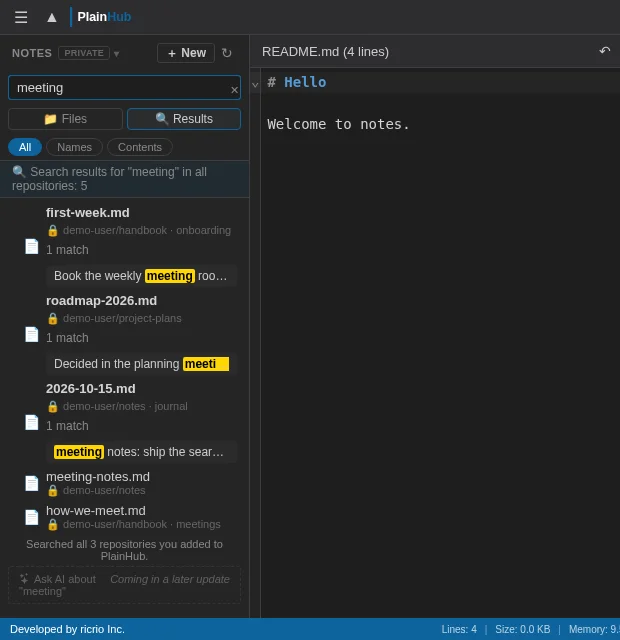
- Press Enter (or click "↵ Search all repositories" below the results). Results from the repositories you added appear in one list, with the repository name in each row
One search box
Type in the search box at the top of the sidebar. PlainHub searches the file names and the contents of the whole repository you are in, at the same time. Files whose names match come first. Search starts at 2 characters.
This repository
Results appear as you type: file names (anywhere in the path) and the lines that match
All repositories
Press Enter, or click "↵ Search all repositories" below the results
Jump to the line
Click a result that matched in the contents to open the file at that line, even in another repository
- Filters: All / Names / Contents, the same for this repository and all repositories
- Keyboard: Ctrl+K, Ctrl+P or / to search. Ctrl+Shift+F to search all repositories (⌘ on Mac). ↑↓ to pick a result, Enter to open, Esc to stop
- No AI key needed: search works without any AI setup
Search all repositories
Find a note when you don't remember which repository it is in.
- Scope: Only the repositories you added to PlainHub. Repositories you did not add are not searched. If you added many, the 30 most recently updated ones are searched
- When: Only when you press Enter or click the row. Typing alone does not send anything to GitHub's search
- Results: The same rows as in this repository, with the repository name in the location
- What was searched: A line below the results tells you which repositories were searched, and why something could not be searched. When GitHub refuses the search (for example, its search limit) or cannot be reached, PlainHub tells you instead of just showing "No results"
Use cases
- Find information across documents scattered in multiple repositories
- Search for specific keywords (API names, config values) across projects
- Instantly answer "which repo was that file in?"
How it differs from GitHub's code search
Both can search file names and contents across the repositories you have access to. They differ in what they are made for.
| GitHub's code search | PlainHub | |
|---|---|---|
| Made for | Code | Notes and documents (Markdown and text) |
| Regular expressions and symbol search | ✅ | ❌ (not yet) |
| Search all public repositories on GitHub | ✅ | ❌ (only the repositories you add) |
| Limit the search to repositories you choose | ✅ With repo:, org: or user: | ✅ The repositories you added, without typing filters |
| On your phone | ✅ In the mobile browser | ✅ In the mobile browser |
| Edit what you found | ✅ Open the file, choose Edit, then commit | ✅ It opens in the editor, and saving commits |
| How many repositories at once | ✅ All you can access | △ Of the ones you added, the 30 most recently updated |
Ask AI: answers with sources
Type a question in the search box and choose Ask AI. PlainHub turns the question into search words, searches this repository or all the repositories you added, and the AI answers from the matching lines, with sources (repository › file, and the line when it is known). The sources come from the files the search actually found, not from paths the AI writes.
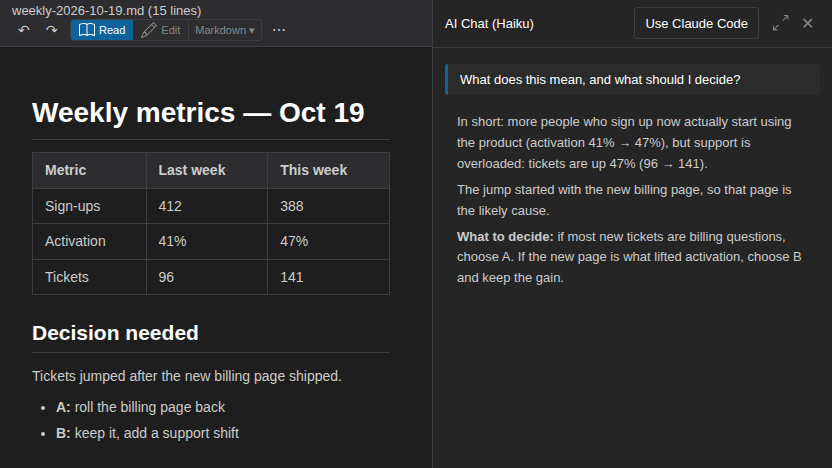
- With Your agent (your own Claude Code on your PC): no AI key needed.
- With your own Anthropic API key: the cost of each answer is shown.
| GitHub's code search | PlainHub | |
|---|---|---|
| Ask in plain words and get an answer with sources | ❌ (GitHub Copilot Chat can answer about repositories, with a Copilot plan) | ✅ With Your agent or your own API key |
Other ways to search across repositories
- GitHub's code search: type a query such as
repo:your-name/notes repo:your-name/docs "meeting"at the top of github.com. Addorg:your-orgto search a whole organization. It also supports regular expressions and symbol search, and it is the best choice for searching code. - Sourcegraph: indexes repositories from several code hosts (GitHub, GitLab and others) into one search. It fits large teams that search a lot of code.
- grep.app: searches public repositories on GitHub. It does not search your private repositories.
- PlainHub: searches only the repositories you added, from one box, in the browser or on your phone, and opens what you find in the editor. It fits notes and documents that you also want to fix right away.
Frequently asked questions
Can it search private repositories?
Yes, the private repositories you added to PlainHub and allowed PlainHub to use on GitHub.
How many repositories can it search at once?
Searching all repositories covers the repositories you added. If you added many, the 30 most recently updated are searched, and a line below the results says how many were searched.
Do I need an AI key?
Not for search: it works without any AI setup. For Ask AI, use Your agent (your own Claude Code, no key) or your own Anthropic API key.