A GitHub editor, wired to Claude Code.

PlainHub wraps GitHub's complexity into three things: open, write, save.

No clone, branch or push to learn. Ask AI about the file in front of you, or let your own agent run GitHub in plain words. Every save is still a commit, in your own GitHub.

Try it now

No setup to see it work

For Claude Code users

Already use Claude Code?Connect to it from PlainHub, and use it from any browser — even your phone, even by voice.

PlainHub connects to the Claude Code running on your own PC. No API key — it runs on your Claude plan, and your files stay in your GitHub.

  • Ask from your phone. Your PC does the work; you ask and read from anywhere.
  • Approve from anywhere. When Claude Code asks permission, the card comes to whichever screen you are on.
  • Talk to it. Ask out loud and hear the answer, hands-free.
  • Read what it wrote. Markdown rendered, changes as diffs, every version in history, not in a terminal scroll.
  • Let it run GitHub for you. Issues and repositories in plain words, with your own login.

Connect in 3 steps

  1. npm i -g plainhub
  2. In the folder you want to ask about, run plainhub agent
  3. In PlainHub, open Settings → AI → “Connect your own agent” and enter the pairing code

On that PC: Node.js 18 or later, Claude Code signed in, and Chrome or Edge. Setup guide

How it's built

On the same PC, PlainHub talks to a small local agent that runs Claude Code. From a phone, questions and answers travel through a private GitHub repository you own, a mailbox, so nothing reaches your PC from the internet. By default it only reads; Cockpit mode lets it change files, with Plan or Auto chosen in the panel.
Everything it does

GitHub, without the git.

Each card is one piece of GitHub you never have to learn. Open “How it's built” for the engineering behind it.

Write

Every save is a commit

Write and save. PlainHub turns each save into a Git commit, so you never see git but always have the history.

How it's built

Saves go through the GitHub API. If GitHub answers that the file changed underneath (409), the save retries on its own instead of showing an error.

Write

Read it formatted, edit it as plain text

Headings, tables and images look right when you read. One click, and it is plain text you can edit.

How it's built

CodeMirror for editing; a separate renderer for reading, with the same look in light and dark themes.

Write

Paste an image into a note

Paste a screenshot and it lands in the repository, linked right where your cursor was.

How it's built

The image is committed next to the note and the Markdown link is written for you.

Write

Edited in two places? See the difference

When the same file changed somewhere else, you get a diff and choose what to keep.

How it's built

conflict-diff.js compares your version with the one on GitHub before anything is overwritten.

Write

History and drafts that wait for you

Look back at earlier versions, and keep unsaved writing even if the tab closes.

How it's built

Version history reads the commits. Unsaved drafts stay in the browser for 30 days.

Write

Organize it like a drive

Drag files in from your computer and drag them between folders. Right-click to rename, duplicate, move, download or delete. Select several and take them as one zip. It works like the drive you already know, and every change is kept.

How it's built

Every upload, move and rename becomes an ordinary Git commit, so the full history stays in your GitHub and nothing is lost. Folders are moved with everything inside them.

AI

Ask AI what the page in front of you means

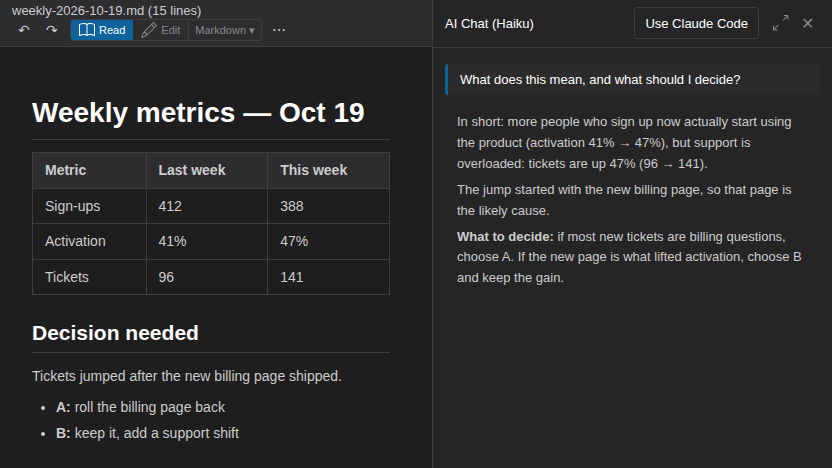
Open a dashboard, a report or a card and ask “what does this mean?” or “what should I decide here?”. The AI explains the document you are reading.

How it's built

The open file goes with the question, so there is nothing to copy or upload.

AI

Ask, review, then save

Ask for a change to the open file and read it before it is written.

AI

Show it a picture

Paste a screenshot or photo into the AI panel and ask about it.

How it's built

Images go with the question. Works with Your agent, your own Claude Code with no API key needed, or with an Anthropic API key if you prefer.

AI

Hands-free: just talk to it

Tap the wave button and talk. It sends when you stop, reads the answer aloud, and listens again. Connect Your agent and you run your own Claude Code by voice. Prefer typing? Dictate, or have any answer read aloud.

How it's built

Half-duplex: it never listens while it speaks. When an action needs approval it stops listening and asks you to approve on the screen; a spoken “yes” never approves. Timing is measured on the device only.

AI

Ask AI how — or let it do it for you

Not sure where a setting is? Ask the AI. It answers from the user guide, and can do it for you: open a file, switch repositories, change the theme.

How it's built

When the panel answers with an Anthropic API key, it reads the official user guide first, and it has tools for the app itself: open files, switch repositories, change theme, font size or Read/Edit. Creating files asks you first.

Find

Search across all your repositories

One search box across all your repositories. The boundaries between projects disappear.

How it's built

cross-repo-search.js fans the query out across repositories and merges the results.

Connect

Your agent: your Claude Code, anywhere

Use the Claude Code on your PC from PlainHub in any browser, including your phone.

How it's built

The phone talks to your PC through a private GitHub repository you own, a mailbox. Messages queue while it is answering.

Connect

Run GitHub in plain words

“Open an issue for this.” “Close it.” “Create a private repo for meeting notes.” Your own agent does it for you, from the AI panel, even on your phone.

How it's built

PlainHub itself never holds that power. Your agent is Claude Code on your PC, using your own GitHub login and your own permission rules. In Plan it only proposes; in Auto it acts.

Connect

One link opens the exact file

Share a URL that opens a file, at a line, with the theme and preview you chose.

How it's built

One core.js builds these links for the web app, the CLI and the MCP server.

Start

Try it first, connect GitHub later

Start writing right away, with no account. Save it to GitHub when you are ready.

How it's built

The guest note lives only in the browser and is never sent anywhere until you choose to save.

Start

Install it like an app

Add PlainHub to your home screen or desktop and open it like any app.

How it's built

A Progressive Web App with an offline-ready shell.

Trust

Stays under your GitHub's controls

Your files live only in your GitHub, so the rules you already have there (permissions, 2FA, history) keep applying. PlainHub's servers never hold your files.

How it's built

File contents go between your browser and GitHub. Only the sign-in step passes through a small PlainHub server, and it never sees your files.

Closer look

The AI panel

AI panel

An AI that already sees the file you have open

  • Ask what it means. “What should I decide here?” works on a dashboard, a report or a decision card.
  • Ask for a change. You see exactly what changes before anything is saved.
  • Show it a screenshot and ask about it.
  • Talk to it, hands-free. It answers out loud, then listens again.
A weekly metrics report open in PlainHub, with the AI panel beside it explaining in plain words what the numbers mean and what to decide
Behind the build

A team of AI agents builds it. One engineer decides what ships.

I build and run PlainHub at ricrio inc., and use it every day on PC and phone. It's my test bed: I try every method on my own work before I bring it to a client — so it changes every day, and some edges are still rough. If something breaks, I'd love to hear about it.

63releases to production since 13 October 2026, each one approved by a person
200+automated test files run before every release
Dailymy own main editor, on PC and phone
The development loop

AI agents do the work. A person decides what ships.

  • Agents with separate roles plan, build, test and review each change
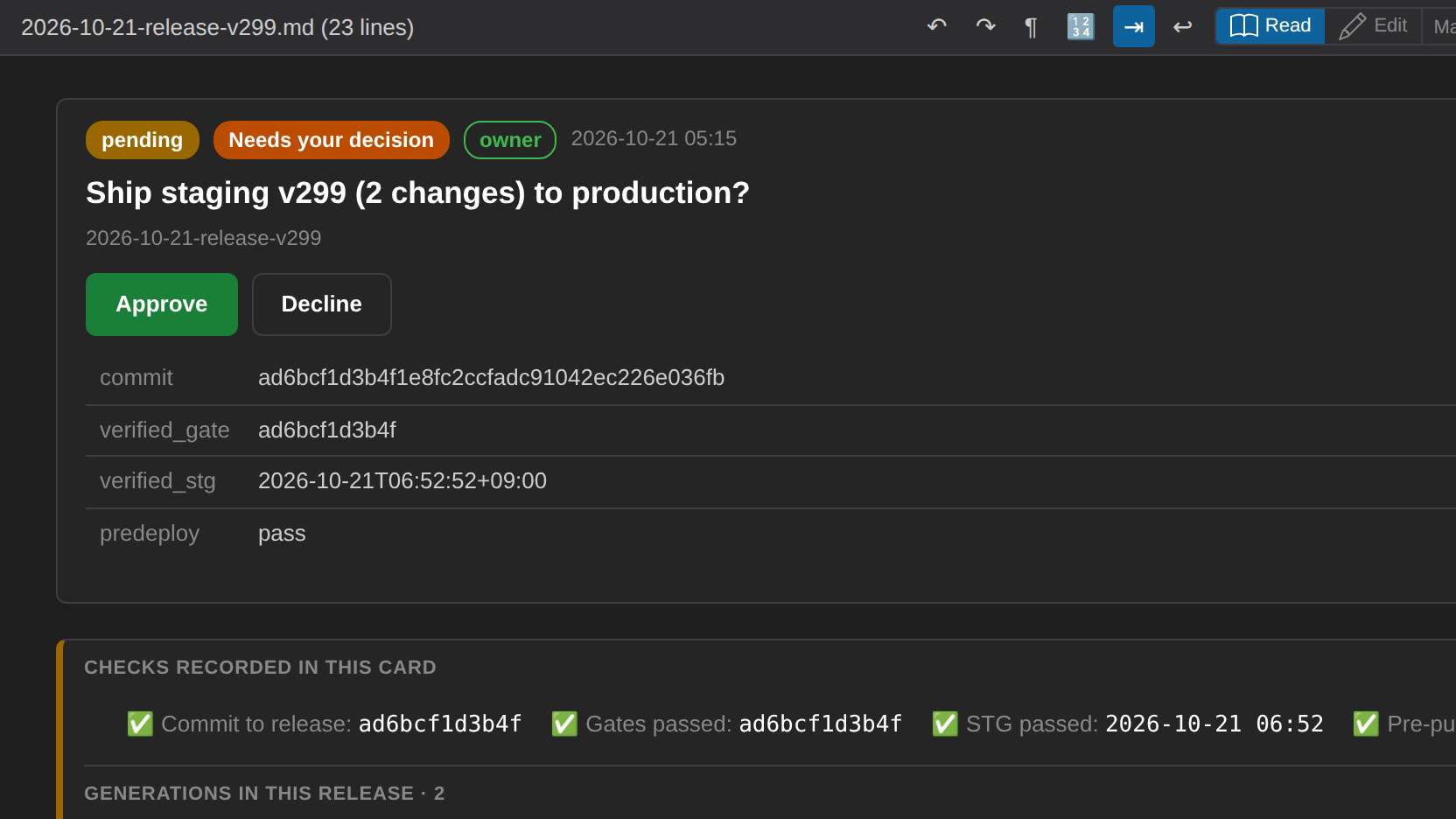
  • I decide on a short card: approve, or send it back
  • Approved work ships to production on its own, is checked after release, and rolls back if a check fails
  • Since 13 October 2026, 63 releases have reached production this way, each one approved by a person
A release card in PlainHub waiting for a person: Approve or Decline, the work it includes and the checks it passed
01 · One definition, many outputs

A single core shared by the web app, CLI and MCP server

Links built by people and links built by AI agents come from the same code, so they never drift apart.

02 · Tests that also film

Tested end to end, without touching real data

Every feature is exercised in a real browser against a safe copy of GitHub. More than 200 automated test files run before every release. The same scripts record the clips on this page, so no real account or secret is ever on screen.

03 · One road to production

Gates, staging, release, check, roll back

The commit that passed the gates is the one that ships. After release it is checked, and a failed check puts the previous version back automatically.

04 · Safe by design

Built in a sandbox, checked from inside and outside

AI agents work in isolated containers, away from real accounts. Only files on an allowlist can be published, and every release is scanned before it goes out. From the outside, an automated check regularly looks at everything public the way a scanner on the internet would, so a mistake is found by me first.

Work with me

Want this kind of AI workflow running in your team?

I design and deliver AI agents and tooling that reach daily use, from requirements across regions to production. Remote, Tokyo (JST), overlapping US afternoons and EU mornings. I take on a few projects at a time, so I can't reply to every message, but I read them all.

Message me on LinkedIn