How to keep documents (not code) in GitHub with version history
Short answer
- To put a few files in GitHub once, GitHub's own website is enough: open the repository, choose Add file → Upload files, and drop the files in. Every upload is saved in the history.
- To keep documents you write and change often, use a tool that opens the files in the browser or on your phone and saves each change to GitHub for you, such as PlainHub. As with Google Drive or SharePoint, you drag files in and go back to earlier versions from the version history, without running Git commands.
What people usually want
| What you want | Example |
|---|---|
| Keep every version | See last month's version of a manual, and go back to it |
| Add files without Git | Drag a folder of PDFs and Markdown files from the desktop |
| Edit from anywhere | Fix a typo in a meeting note from your phone |
| Keep the files your own | The files stay in your GitHub repository, not in someone else's service |
Your options
- GitHub's website: Add file → Upload files takes files by drag and drop and saves them as one commit. You can see the history of each file. Editing is done one file at a time in GitHub's code view, which is made for code.
- GitHub Desktop: an app for Windows and Mac. You work in a folder on your PC and press Commit and Push to save to GitHub. It does not run on phones.
- Obsidian with a Git plugin: a note app that saves to a local folder; a community plugin commits and pushes it to GitHub. Setting it up takes some Git knowledge, and the mobile app needs extra setup.
- Cloud drives (Google Drive, Dropbox, OneDrive): drag and drop and version history are built in, but the files are not in a GitHub repository, so they are not next to your code, your AI agents or your other repositories.
- PlainHub: an editor that opens your GitHub repositories in the browser and on your phone. Drag files or folders from your desktop onto the file list to add them. Each save becomes a commit, and Version history shows the file's earlier versions in a readable list.
How it works with PlainHub
- Sign in with GitHub at plainhub.dev and pick a repository.
- Drag files or folders from your desktop onto the file list on the left, or choose + New → Upload files. Up to 100 files and 25 MB per file at a time, the same limit as GitHub's own upload. One drop becomes one commit.
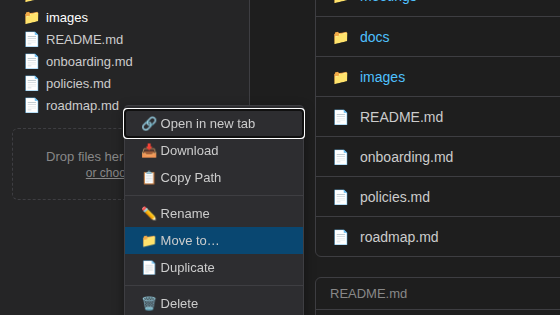
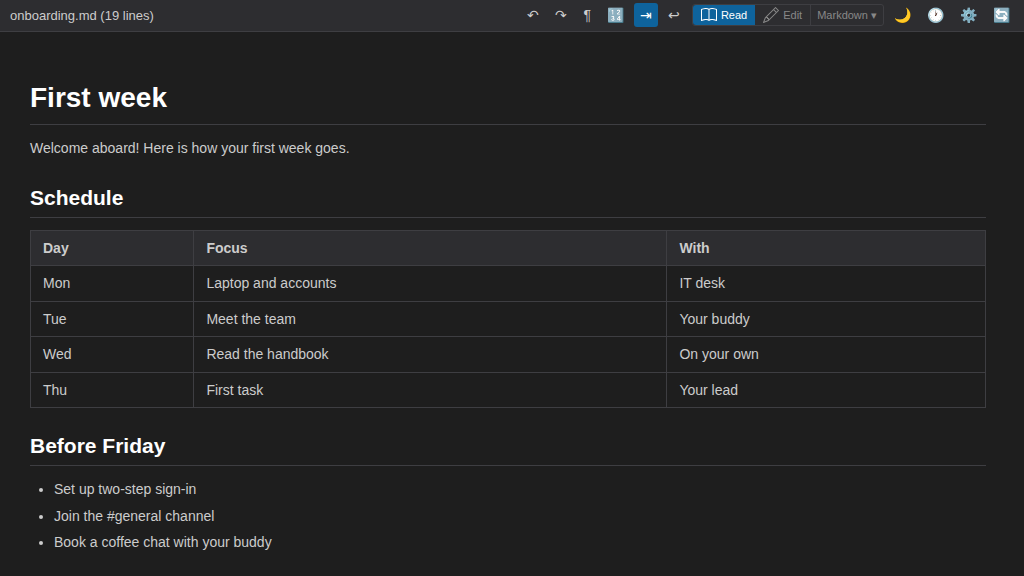
- Open a Markdown or text file to edit it in the browser or on your phone. Saving writes a commit to your repository.
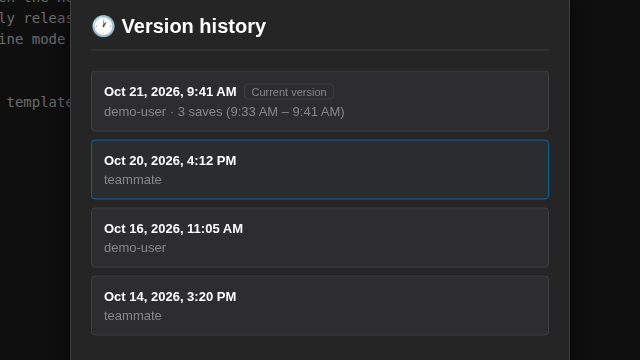
- Open Version history for a file to see its earlier versions. Saves made close together are grouped into one version, as in Google Docs, while every commit is still kept. Open an earlier version and choose Restore this version to bring its text back; the current text stays in the history.
The files stay in your own GitHub repository. You can still use Git, GitHub Desktop or any other tool on the same repository.
If your documents are spread over more than one repository, add each of them and search across multiple repositories at once: one search box looks through the file names and contents of the repositories you added.
Compared with Google Drive or SharePoint
| What feels the same | What is different |
|---|---|
| Drag files and folders in to add them | There is no sync app that mirrors a folder on your PC |
| Open a file from the list on the left and edit it in place | Word and Excel files can't be opened and edited (text and Markdown are the focus) |
| See the version history as a list and go back to an earlier version | Sharing and permissions are set in GitHub (PlainHub has no share button) |
What PlainHub does not do
- It does not compare the contents of Word or Excel files. You can store them, and GitHub's history shows when they changed, but PlainHub's version view shows text files.
- It is not a sync client: it does not mirror a folder on your PC.
- It does not replace GitHub's permissions. Who can see the files is set in GitHub.
Which one fits
| Situation | Fits |
|---|---|
| Upload a few files once | GitHub's website |
| You work on a PC in a local folder and are fine with commit and push | GitHub Desktop |
| You already use Obsidian and can set up Git | Obsidian with a Git plugin |
| You only need sharing and version history, not GitHub | A cloud drive |
| You want drag and drop, editing on the phone, and version history, with the files in your own GitHub repository | PlainHub |
FAQ
Do I need to know Git? No. With GitHub's website or PlainHub, you add and edit files without Git commands. Git still records every change in the background.
Can I go back to an older version? Yes. Every save is a commit, so earlier versions stay in the repository's history. In PlainHub, Version history shows them for each text file.
Where are my files stored? In your own GitHub repository. PlainHub reads and writes them through GitHub.
Is it free? Yes. PlainHub is free for everyone — individuals, teams and organizations. If your organization needs something PlainHub doesn't include, such as SSO or running it on your own servers, we can build a custom setup for you. See Pricing.
Sources
- Adding a file to a repository (GitHub Docs): https://docs.github.com/en/repositories/working-with-files/managing-files/adding-a-file-to-a-repository
- GitHub Desktop: https://desktop.github.com/
- Obsidian Git (community plugin): https://github.com/Vinzent03/obsidian-git