How to use Claude Code from your phone, with no API key
Short answer
- Keep Claude Code running on your own PC, signed in with your own Claude account. No API key is needed.
- Your phone and your PC pass questions and answers through a private GitHub repository of your own (the mailbox). Your PC goes out to check it every few seconds, so nothing needs to connect in to your PC.
- Do the first setup on your PC (a terminal is needed). After that, you ask from your phone in the browser.
- By default, Claude Code only reads the folder you start it in. It can't change files or run commands unless you choose to let it.
The problem
Claude Code runs in a terminal on your PC. When you are away from your desk, you may still want to ask it about your notes or your code: what is still open, where a function is used, what a file says.
Your phone can't reach a terminal on your PC by itself, and opening a way into your PC from outside takes setup and care. The steps below don't open your PC, and don't need an API key.
How it works
- On your PC, a small program from the npm package
plainhubstarts Claude Code in the folder you choose. - The program checks the mailbox repository on GitHub every few seconds. When it finds a question, it asks Claude Code and writes the answer back.
- On your phone, PlainHub (a browser editor for your GitHub repositories) writes the question to the mailbox and shows the answer.
Questions (with the file you have open) and answers are saved in the plainhub-chat branch of the mailbox repository. Keep your PC on and awake while you ask from your phone.
What you need
- A PC (Windows, macOS or Linux) with Node.js 18 or later. Check with
node -v. - Claude Code, installed and signed in.
claudemust work in a terminal. - A GitHub account, on your PC and on your phone.
- A phone with a web browser.
Start on your phone? Send the link to your PC
The first setup needs a terminal, so it happens on your PC. If you are on your phone now, open app.plainhub.dev, sign in, then tap AI at the top and Connect your own agent. Tap Send to your PC to send the link to yourself (where your phone can't share, tap Copy link instead). On your PC, sign in to PlainHub with the same GitHub account and open the link: it opens on From your phone, with the same steps as below.
Step 1: Make the mailbox repository
On github.com, create a new repository just for this, for example YOUR_NAME/claude-mailbox:
- Choose Private. The agent refuses a public repository.
- Check Add a README file. The agent refuses an empty repository.
- Don't use a repository that other people can write to. The agent answers only questions written by you.
Step 2: Install and give the agent a token
Once, in a terminal on your PC:
npm i -g plainhub
plainhub auth
plainhub auth opens GitHub's page for a new fine-grained token, with Contents: Read and write already selected. Under Repository access, choose Only select repositories and pick the mailbox repository. Generate the token and paste it in the terminal.
Step 3: Start the agent in your folder
Go to the folder you want to ask about, for example the clone of your notes repository, and start the agent with the mailbox:
cd ~/notes
plainhub agent --mailbox YOUR_NAME/claude-mailbox
Leave this terminal open. The agent answers only while it is running.
Pick the folder with care. Claude Code can read everything in it, so don't use your home folder itself, or a folder with secrets (.env files, keys).
Step 4: Connect from your phone
On your phone, sign in to app.plainhub.dev with the same GitHub account. Tap AI at the top, then Connect your own agent, then From your phone. Enter YOUR_NAME/claude-mailbox and tap Connect.
If you let PlainHub use only some of your repositories, let it use the mailbox repository too: tap Add it on GitHub under the message, select the repository, save, and tap Connect again.
Ask
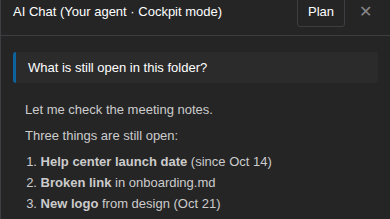
Open the AI panel and ask in plain words, for example:
What is still open in this folder?The answer comes from the Claude Code on your PC. Deep questions that read many files can take 20 seconds or more.
When it doesn't work
- No agent found: that message is for connecting with the agent's link, which works only in a browser on the same PC. On your phone, use From your phone and enter the mailbox repository name.
- Your home PC isn't answering: check that
plainhub agent --mailbox …is still running, and that the PC is not asleep. - The repository is public, empty, or other people can write to it: make a new private repository under your own account, with a README, as in step 1.
- The token can't reach or write to the repository: run
plainhub authagain, pick the mailbox repository, and keep Contents: Read and write. - Claude Code was not found: you may have started the agent in your home folder. For safety, it ignores programs installed inside the folder it reads. Stop it with Ctrl+C, go into the folder you want to ask about, and start it again.
To check everything at once, run plainhub doctor --mailbox YOUR_NAME/claude-mailbox on your PC. It shows what is missing and changes nothing.
The Your agent guide has every step and message.
Try PlainHub without signing in
FAQ
Do I need an API key?
No. Claude Code runs on your PC, signed in with your own Claude account, as it does in your terminal.
Can Claude Code change my files?
Not by default. It only reads the folder you start it in. If you want it to change files and run commands, start the agent with --cockpit in a folder you trust. The panel starts in Plan, which changes nothing, unless your own Claude Code settings make auto the default. In Auto, Claude Code makes the changes and runs the commands it judges safe without asking (commands run on your PC, as you), and sends the rest to your phone to approve. Files can carry instructions that Claude Code may follow, so don't use Auto with someone else's files open. See Cockpit mode.
Does my PC need to stay on?
Yes. Your PC does the work, so keep it on and awake, with the agent running, while you ask.
Where do my questions go?
Questions and answers are stored in the plainhub-chat branch of your private mailbox repository. When Claude Code answers, the parts of your files that it reads are sent to Anthropic.
Sources
- https://github.com/ricrio-inc/plainhub/blob/main/docs/YOUR_AGENT.md
- https://code.claude.com/docs/en/overview
- https://docs.github.com/en/repositories/creating-and-managing-repositories/creating-a-new-repository
Checked: 2026-11-08