How to share your AI coding agents' work and approvals with your team
Short answer
- If your team uses only Claude Code, commit
CLAUDE.mdand.claude/settings.jsonto share the same instructions and settings, and on a Team or Enterprise plan share cloud sessions with your organization. - If you want your agents to post their progress and ask a person for approval in one place, and you want that record to stay in your own GitHub repository as plain Markdown, use a shared ledger such as PlainHub's.
What "sharing agent work" usually means
People asking this question usually want one or more of these:
| Need | Example |
|---|---|
| Same setup for everyone | Everyone's Claude Code follows the same rules and uses the same plugins |
| See progress | "What did the agents do overnight, and what is still running?" |
| Approve decisions | An agent asks "Should I change the API, or keep the old one?" and waits for a person |
| Keep a record | Months later, you can still read why a decision was made |
Most tools cover the first two. The last two are where the options differ the most.
Options built into Claude Code
- Shared instructions and settings: commit
CLAUDE.mdand.claude/settings.json. Everyone who clones the repository gets the same rules, permissions, hooks and plugins. This shares the setup, not the work. - Cloud sessions: on Team and Enterprise, a session can be visible to your claude.ai organization. Pro and Max can share a session publicly. The shared view does not update in real time.
- Remote Control: continue a session on your PC from the Claude app and approve permission prompts on your phone. It is for your own account, not for a team.
- Projects (public beta): groups parallel threads and shows what is "Waiting on you". At the time of writing it is available on Pro, Max and Ultra, not on Team or Enterprise.
These work well if everyone uses Claude Code and your team is on a plan that supports them.
GitHub Agent HQ and the Copilot coding agent
GitHub's Agent HQ (Mission Control) lets you assign tasks to supported agents, watch their session logs, steer them mid-run, and review the pull requests they open. Approval happens as a pull request review. It needs a paid Copilot plan, and it shows the agents that GitHub supports.
Choose this if your work lives in GitHub pull requests and your agents are the ones Agent HQ supports.
A shared ledger in your own repository
A shared ledger is a folder of plain Markdown files in a GitHub repository you own. Agents write work threads and decision cards there; a person reads them and approves or declines.
How it works with PlainHub:
- Start a ledger in a repository:
plainhub ledger init <folder>from theplainhubCLI, orplainhub_ledger_initfrom the PlainHub MCP server. - Your agents post progress to a work thread (
plainhub_post) and raise a decision card when they need a person (plainhub_decide). Claude Code and the Codex CLI do this with the PlainHub MCP server's tools. The ledger files are plain Markdown. - The ledger is shared through Git (
plainhub_ledger_synccommits only the ledger folder, then pulls and pushes). - A person opens the repository in the PlainHub editor, on a PC or a phone, reads the card, and presses Approve or Decline. The agent reads the result and continues.
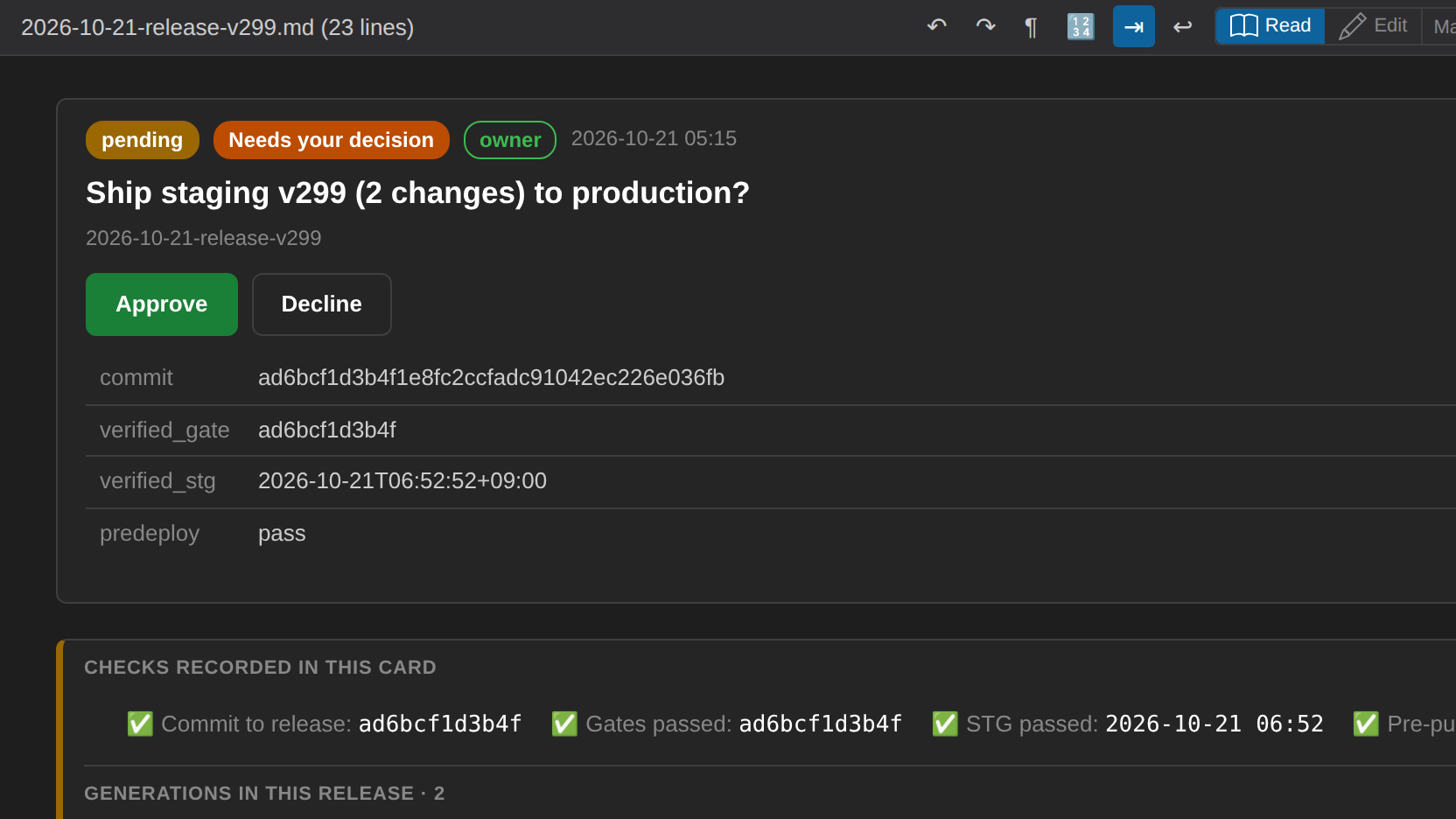
Because the record is a folder in your repository, it is versioned with Git, readable without PlainHub, and stays where your code is.
What PlainHub does not do: it does not run your agents, it is not a CI system, and it does not replace pull request reviews. It has no Slack integration.
Which one fits
| Your situation | Good fit |
|---|---|
| Everyone uses Claude Code, and you only need the same setup | Commit CLAUDE.md and .claude/settings.json |
| You are on Claude Team or Enterprise and want to show a session to colleagues | Claude Code cloud session sharing |
| Your agents work in GitHub pull requests and are supported by Agent HQ | GitHub Agent HQ |
| You use Devin or Factory | Their own sharing features (Slack threads, team sessions) |
| Decisions that are not code changes, approvals in one place, and a record in your own repository | A shared ledger, such as PlainHub's |
FAQ
Can I use this with agents other than Claude Code? We have tested the whole flow (post, approve in PlainHub, read the result and continue) with Claude Code and with the Codex CLI. In Codex, add the PlainHub MCP server and allow its tools to run without asking, for example in ~/.codex/config.toml:
[mcp_servers.plainhub]
command = "plainhub-mcp"
env = { PLAINHUB_LEDGER = "/path/to/your/repo" }
default_tools_approval_mode = "approve"
Agents other than Claude Code and Codex (such as Cursor or Gemini CLI) should work the same way if they can use an MCP server, but we have not tried them yet.
Where is the data stored? In your GitHub repository, in the ledger folder. PlainHub's editor reads and writes it through GitHub.
Do I need a paid plan? Yes. PlainHub is free for everyone — individuals, teams and organizations. If your organization needs something PlainHub doesn't include, such as SSO or running it on your own servers, we can build a custom setup for you. See Pricing.
Sources
- Claude Code settings: https://code.claude.com/docs/en/settings
- Claude Code on the web (session sharing): https://code.claude.com/docs/en/claude-code-on-the-web
- Remote Control: https://code.claude.com/docs/en/remote-control
- Claude Projects: https://code.claude.com/docs/en/claude-projects
- GitHub Mission Control: https://github.blog/ai-and-ml/github-copilot/how-to-orchestrate-agents-using-mission-control/
- Copilot coding agent: https://docs.github.com/en/copilot/concepts/agents/coding-agent/about-coding-agent
- PlainHub MCP server: https://github.com/ricrio-inc/plainhub/blob/main/docs/MCP_SERVER.md